

Since switching to fedora, I have been testing out its features and i just now ran into my first problem; Since my laptop doesn’t have a SD card reader, I have to use an external SD card reader when i want to access my microSD cards. I recently tried to put in my Acer 2-in-1 SD Card reader and my system did not pick up that i inserted the card reader. I’m not sure on what I am supposed to do about that, so if anyone can give me any advice I’ll appreciate it.
Update: So I decided to put in a different brand of SD card into the card reader (to test if the card could be an problem) and Dolphin immediately read and put it in the removable device section. The sd card that is having issues was a Sandisk card. Verbatim was mounted easily, so something is going on with my Standisk card.
did not pick up
In what sense?
Like, if you do something like:
$ lsusb > not-in.txtThen plug it in (I’d have the SD card in, but I don’t think that it’d likely matter at the USB level) and do:
$ lsusb > in.txtAnd then do:
$ diff -u not-in.txt in.txtNo differences show up?
If the host can talk to the USB drive, then I’d expect it to show up there.
EDIT: If it shows up there, then I’d think that the machine is talking to the device at a USB level. To see whether the host can see the block device corresponding to the SD card, I’d do the same with
lsblk(for this one, the SD card probably has to be in the reader):$ lsblk > not-in-blk.txtInsert the USB reader into the machine.
$ lsblk > in-blk.txtAnd then:
$ diff -u not-in-blk.txt in-blk.txtIf it can see that, then it can see the block device with the data on it, the card. The filesystem or something like that might be corrupt or something, but should still show up at that level.
EDIT2: If the above works and you’re wanting KDE Plasma to pop up a window when you plug the thing or something and that’s not happening and that’s what’s you’re concerned about that…I don’t use KDE Plasma, so I’ve no idea what expected behavior is there. Maybe someone who uses it could tell you. I imagine that it has some kind of filesystem browser and it’s probably visible somewhere there, but…shrugs
In a plain-Jane Linux sense, if you have a block device, you’ll probably have one block device, and maybe it’ll be partitioned and have smaller block devices for each partition. Maybe
/dev/sdbfor the main device or something and/dev/sdb1for the partition. If you can see the block device for the partition (like, you can see it appear and disappear when runninglsblkwhen you plug in and unplug the device), you can mount the block device in the traditional Linux way (with the correct block device where I’m using/dev/sdb1below):$ sudo mkdir /mnt/sdcard $ sudo mount /dev/sdb1 /mnt/sdcardAnd then before you unplug it:
$ sudo umount /mnt/sdcardThat’ll be independent of any GUI filebrowser or whatever.
Thank you, ill try this and see what happens. Basically, when i plug in the USB card reader, my laptop shows that it was inserted but it dosent show in the files folder for me to access it.
Ah, okay. Probably want someone who knows Plasma, then.
I never had an issue with my card reader and I use Fedora. Did you have a card in the reader? Since Linux doesn’t have “drives” like in Windows, it may look like there’s nothing there until you plug one in
One word of caution: it is really important that you eject (unmount) the card if you write to it. Linux is more aggressive about buffering writes so you will lose data if you don’t.
Yes, i had a card in the reader. My laptop will show that the UsB reader is inserted but it dosent show the card nor the reader in my files folder.
Ok. Can you tell me more about what you are using? Are you on KDE and using Dolphin for the file manager? If Dolphin, do you see anything at all under removable devices? What file system is the card formatted as?
Can you also try running:
sudo journalctl --followin a terminal, plug in the reader, and check if you see something like “kernel: sd 12:0:0:1: [sdc] Attached SCSI removable disk”.Yes, Im on KDE and i use Dolphin. Nothing shows under removal devices when i look on the folder screen. When i get the some free time, im gonna run the commands that some of yall gave me to see where the issue is.
Okay, so I ran this command and I don’t see anything of that nature relating to the SD reader. I was also writing the commands from Tal’s comment and it’s not picking up the SD card reader at all, nor of what’s in it. It just reads the +sda, zram0 and nvme0n1
Gonna make an edit real quick: so the system is picking up the disk I see it labeled as [sda] Attached SCSI removable disk but the microSD card is not being read into the disk nor is it showing on the Dolphin file manager that it’s there.
ok, so I think if it sees the device being plugged in, then it probably sees the card reader. You could try running
lsusbto see all your USB devices, andlsblk -o NAME,FSTYPE,MOUNTPOINTSto see your block devices (disks), and see if it appears there also.It still may not be able to actually read the file system even though it sees it as a disk. One reason for that could be it’s not supported by your kernel. Do you know what file system the card is formatted with? If it appears in the lsblk output, it will say in the second column.
Edit: when I tested this with my own card reader, I see this output:
$ lsusb
Bus 002 Device 002: ID 0bda:0301 Realtek Semiconductor Corp. multicard reader
$ lsblk -o NAME,SIZE,TYPE,FSTYPE,MOUNTPOINTS NAME SIZE TYPE FSTYPE MOUNTPOINTS sda 3.6T disk ├─sda1 16M part └─sda2 3.6T part ext4 /mnt/disk2 sdb 0B disk sdc 0B disk sdd 0B disk sde 0B diskEach device (sda, sdb, sdc) is a physical disk. sda is my SSD. sdb, sdc, sdd, and sde are all “drives” from the multi-reader. Each type of card shows as its own, basically.
Now if I plug a card in, I get a little icon in the system tray (disk and devices) where I can mount and open it. And this has appeared in my
lsblkoutput:sdc 59.5G disk └─sdc1 59.5G part exfatThat is a 64GB SD card formatted with exfat.
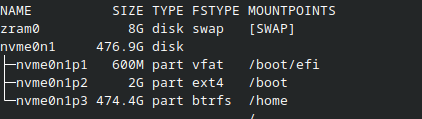
Okay, so I’m copying what your posting and this is what I get: this is what it looks like without the SD card reader. (Also, sorry for the late responses, I haven’t been on my laptop lately)
Now this is what it looks like with the card reader inside: I also have one of my flashdrives in and I see my flashdrive identified but i dont think i see the SD card reader, I am not sure.
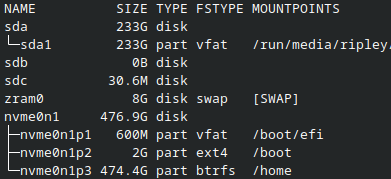
That looks promising actually. Are you able to read the contents of the path that starts with
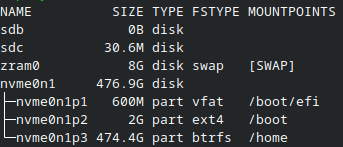
/run/media? If you lost the contents do you set your files? If so, then Linux sees it and it auto mounts, but Dolphin isn’t recognizing it.the /run/media is identifying my USBC flashdrive (this is not the SD card reader,btw) Dolphin recognizes it and puts it under “Removable devices” section and I can access my folders. Now, this is me taking out the USBC flashdrive but i still have my SD card reader in: its like Dolphin dosent recongize the SD card reader
I have definitly corrupted data doing that. I wonder if filesystem matters at all. I usually use f2fs for flash drives.
I suppose some filesystems might be slightly faster to write to thus reducing the time it takes for the data to actually end up on the physical device, but while some filesystems are better equipped to gracefully handle the consequences of an interruption, none of them can fix data that doesn’t exist because the drive was physically removed whilst being written to.
Always sync before ejecting a removable drive.
The biggest UX issue, in KDE in particular (though they made some improvements recently), is that a copy process will say it’s complete (with a notification), but you could be waiting several seconds or minutes before it’s actually done syncing
The sync command will block until it’s done so you will know for sure. I believe ejecting the drive will sync before it reports success also.
In my experience, simply waiting for the activity light to stop flashing is a good enough indication, but not all drives have one.
Yeah, my flash drives are all USBC flashdrives (im glad those are reading as least on my laptop) I mount and eject those every time while using them cause i am a little worry about that happenimg since it dosent come with that light indicator.
This problemis finally fixed on KDE.
Thanks for confirming. Here is a blog technical post about it
In addition to tal’s excellent advice, you might also want to open a terminal and run:
journalctl -fBefore you plug in the reader. Might give you some hints as to what the exact problem is.
I decided to try this code as well and I see one thing that’s in red and stands out, and it says: “ Failed to write “bfq” to sysfs attribute “queue/scheduler”, ignoring: Device or resource busy”