

6·
2 days agoExperienced this at my job today. Im glad that now my only experience with this slop is just the workplace😑😑
Experienced this at my job today. Im glad that now my only experience with this slop is just the workplace😑😑


I really appreciate your help, i really do. Im gonna see if downloading Fedora 45 helps, along with going through the community forum.
That if anything sounds more like a bug on Dolphin’s part. I’m not gonna do that just to get it to read the micro sd card.
Honesly, im getting annoyed with dealing with these stupid, very tedious bugs, and the crazy amount of updates that have been going on within Fedora lately are not helping.
No it’s not formatted. It came as is when I bought it and I have not done anything to it besides putting my microsd cards in it. And you are right, that disk under sdc is the SD card reader.
Crazy thing, this SD card reader was reading fine when I was using Pop Os (even though cosmic was hella buggy). Idk… I kinda find this freaking ridiculous that it cant read it when this is the default file manager.
but let me see if it’s labeled as exfat…
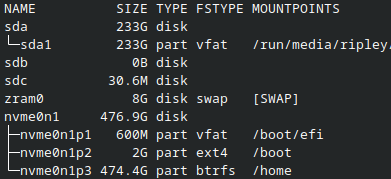
the /run/media is identifying my USBC flashdrive (this is not the SD card reader,btw) Dolphin recognizes it and puts it under “Removable devices” section and I can access my folders.
Now, this is me taking out the USBC flashdrive but i still have my SD card reader in: its like Dolphin dosent recongize the SD card reader
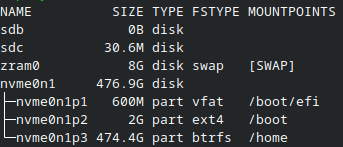
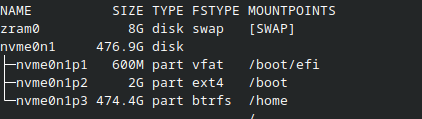
Now this is what it looks like with the card reader inside:
I also have one of my flashdrives in and I see my flashdrive identified but i dont think i see the SD card reader, I am not sure.
I decided to try this code as well and I see one thing that’s in red and stands out, and it says: “ Failed to write “bfq” to sysfs attribute “queue/scheduler”, ignoring: Device or resource busy”
Okay, so I ran this command and I don’t see anything of that nature relating to the SD reader. I was also writing the commands from Tal’s comment and it’s not picking up the SD card reader at all, nor of what’s in it. It just reads the +sda, zram0 and nvme0n1
Gonna make an edit real quick: so the system is picking up the disk I see it labeled as [sda] Attached SCSI removable disk but the microSD card is not being read into the disk nor is it showing on the Dolphin file manager that it’s there.
Yes, Im on KDE and i use Dolphin. Nothing shows under removal devices when i look on the folder screen. When i get the some free time, im gonna run the commands that some of yall gave me to see where the issue is.

Thats eaiser said than done when Uber in alot of areas wiped out other taxi businesses.

Im using it on the Teracube 2s (2025). Kinda laggy phone but very decent.
Yep, thats one reason why i went to e/OS. Never went back.
Yeah, my flash drives are all USBC flashdrives (im glad those are reading as least on my laptop) I mount and eject those every time while using them cause i am a little worry about that happenimg since it dosent come with that light indicator.
Yes, i had a card in the reader. My laptop will show that the UsB reader is inserted but it dosent show the card nor the reader in my files folder.
Thank you, ill try this and see what happens. Basically, when i plug in the USB card reader, my laptop shows that it was inserted but it dosent show in the files folder for me to access it.
Which 4G one in particular? Some won’t work here cause they still relay on 2G/3G or I’ll have to look up the international version of the phone.
Yeah…. A lot of the older flip and small banana like phones are already out of the question cause we no longer have 2G/3G.
The only older flip phone we can use here (were you can still get a signal of course) is the CAT S 22, but the price on that one jumps so much, and personally it’s to bulky for me.
Or you can get the modern TCL flip 5g (or the older ones) but who in 2026 uses Kai0S? I wouldn’t be able to run anything on that phone, there’s no app nor security support with KaiOS.
I would wait for testers to do that to see how the phone functions. Even though it can run android apls, i keep wondering on how far that can be tested, cause the company is saying not all android apps will work.

















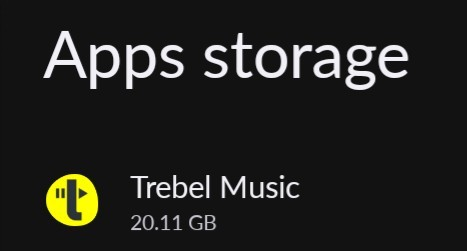




I can second this. I currently have the Teracube 2s (2025) from Murena. Its a decent phone if you keep the apps light, otherwise its a glitchy mess cause 4GB nowadays really isnt enough ram for these phones. Standard at this point for these lower end phones really should be 6GB. But the screen size is 6.1 inches though, so not really on the compact side. Also for the love of god, do not use their stock apps, replace them. They’re stock apps are garbage and slow.